Cricket Guides · 5 min read · English
Agree who will take over and which match record is authoritative. Share the match, wait for acceptance, and confirm the new scorer sees the current innings before the first scorer puts the device away.
On This Page
- Before the Handover
- Choose the Handover Method
- Confirm the Transfer, Then Resume Play
- A Quick Example
- Scorer Handover in Fours & Sixes
- Related Guides
Before the Handover
Tell the next scorer which match is being scored and when the change will happen. Make sure they have a registered account and can sign in. Agree who will announce the change to the teams and umpire.
Agree the arrangement before the match where possible. The ECB’s Play-Cricket Scorer guidance recommends deciding who the main scorer is and when the handover will happen; its app permits one digital scorer at a time (ECB multiple-scorer guidance). Check how your own scoring system handles the change.
Before sending anything, check the current record together if possible:
- Confirm the team names, innings, total, wickets and over.
- Check the striker, non-striker and current bowler.
- Review the latest delivery and any pending wicket or batter selection.
- Mention unusual local rules, corrections or interruptions.
- Keep a paper note of the score at the handover in case the devices cannot connect.
Record the names and change time in the scorer rota. Check that the new scorer starts from the latest completed delivery.
Choose the Handover Method
Use an in-app invitation when you know the next scorer’s Fours & Sixes account. Select their account, send the invitation and ask them to open it. The invitation is tied to that recipient and expires after 10 minutes if not accepted. They need to be online, signed in and have their device account ready to accept. Before accepting, their device account must already be linked in Profile; any pending local import review must be completed.
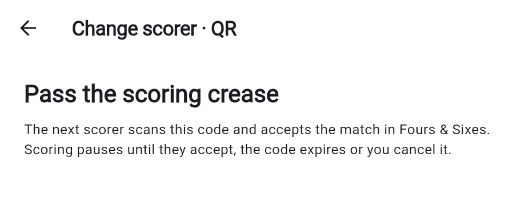
If you do not have the recipient’s account selected, create a one-recipient handover link. It is available as a QR code and a link. The link expires after 10 minutes; if nobody accepts it in time, create a fresh offer. Share it only with the intended scorer. It is a temporary access credential for that match, so do not post it in a public team chat, photograph it for later, or include an active code in a website image.
The Android App can scan the QR code with its camera. The Web App can use the handover link flow; do not assume a browser camera can scan a QR code. If the next scorer is using the Web App, send them the link directly. Both methods require the recipient to accept the offer before they can score.
Confirm the Transfer, Then Resume Play
The current scorer’s access pauses when an offer is created. Wait for acceptance before treating the handover as complete. Ask the new scorer to read back the score, over, striker and bowler to catch a wrong match or stale state.
Once the new scorer confirms the match, they continue from the accepted record. The first scorer can answer questions but should not enter deliveries on a separate copy.
If the recipient cannot accept an in-app invitation, they can decline it or leave it to expire after 10 minutes; the sender has no cancellation control for that invitation. For a QR/link offer, the sender can cancel the code or let it expire after 10 minutes. In either case, confirm scoring access has returned before continuing. A connection failure can leave the first device waiting for the server to confirm that an offer is no longer pending, so do not assume the original scorer can resume just because the recipient has not replied. Check the status in the app, reconnect if possible, and use the agreed paper note as a temporary reference.
Compare the total, wickets, over and last delivery with the umpire’s and scorers’ notes. Make any correction through the authorised match record and tell the other scorer.
A Quick Example
Suppose Quinn is scoring Coastal Kings against Northern Strikers and hands over at the innings break. Quinn checks the completed innings and next innings setup, then invites Ravi. Ravi accepts, opens the match and reads back the teams and score. Quinn confirms the match, then stops entering deliveries; Ravi scores the next ball on the same record.
If Ravi had not been selected in advance, Quinn could instead create a single-recipient link and send it privately. The link remains valid for 10 minutes and cannot be reused by a second recipient. If it expires, Quinn checks the current scorer status before creating another offer.
Scorer Handover in Fours & Sixes
Fours & Sixes supports an in-app invitation or a one-recipient QR/link offer for a registered account. Both expire after 10 minutes if unanswered. Scoring pauses for the current scorer while an offer is pending. The recipient can decline an in-app invitation; only a QR/link offer has a sender-side cancel control. Android supports camera scanning; Web supports the handover link, and browser QR scanning is not claimed. Handover is an in-app acceptance flow, not a push-notification promise.
For local-only scoring without a connection, plan the change before going offline; see how to score without internet. The scoring feature guide explains the current controls. When both scorers can reconnect, use the scorecard guide to check the figures after the match.